Offices & corporate campuses
Lunch peaks, meeting breaks and multiple floors.
- Service follows floor-by-floor traffic
- Occupant feedback without a help-desk ticket
- Reports for workplace and FM teams
Use Cases / Facilities
Smart Restroom Management
Clean restrooms when traffic and feedback say they need it, confirm every service on site, and let work orders, alerts and SLA reports run themselves - for in-house facility teams and janitorial contractors alike.
Start with one floor or one client site.
Overview
Smart restroom management connects visitor traffic, visitor feedback, cleaning activity and work orders for every restroom in one system - so teams clean when a restroom actually needs it, verify every service, and report response times and SLA results without paper logs.
Restrooms - washrooms in Canada, public toilets in many other places - are the most visible test of a building's cleaning standard. Visitors judge them in seconds, and that judgment follows them through the rest of the building. Yet most restroom programs still run on a fixed timetable, a clipboard on the door and a complaint line nobody uses until something has already gone wrong.
PXP replaces that with a closed loop. A people counter shows how busy each restroom is. A feedback tablet, kiosk or QR code tells you how it is performing right now. Thresholds turn negative feedback into work orders and alerts for the right cleaner, and verified check-ins prove the work was done. The same data rolls up into dashboards and leadership reports for facility managers - and for the clients of janitorial contractors.
The Problem
Most restroom complaints are not caused by lazy crews. They come from a plan that doesn't match how the building is actually used - and from having no data to fix it.
Restrooms get cleaned by the clock. They get dirty by the crowd.
Every complaint is a sign that the schedule and the traffic have drifted apart.
“Our crews were doing every round on time. The food-court restroom still failed every lunch hour - because three times as many people used it between 12 and 1.”
The usual advice - audit your traffic, restock before dispensers run out, track complaints by location, check quality after every service - is sound. The problem is doing it by hand. Foot-traffic audits go stale, complaint forms pile up unread, and paper logs can't show when a restroom was really serviced. Smart restroom management automates each of those steps and keeps them running every day.
A step-by-step version of this plan, with the data behind each step: How to reduce restroom complaints with data
How It Works
Each loop works on its own. Together they turn restroom cleaning from a fixed routine into a responsive, verifiable service.
A people counter at the entrance counts visitors anonymously, so service follows real usage instead of guesswork.
A tablet, kiosk or QR code asks how the restroom is and why - cleanliness, supplies, odor or maintenance.
Per-restroom thresholds open a work order and notify the assigned cleaner, escalating to a supervisor if the SLA is missed.
Cleaners check in at the restroom itself, and every service, response time and SLA result is on record.
Most teams start with the feedback display and verified check-ins, then add people counting at their busiest restrooms. Because every restroom has its own schedule, thresholds and assigned cleaner, the system can be set up one floor or one client site at a time and expanded from there.
Visible Service
The feedback tablet at the door doubles as a live service display - visitors can rate the restroom and see that it is looked after.
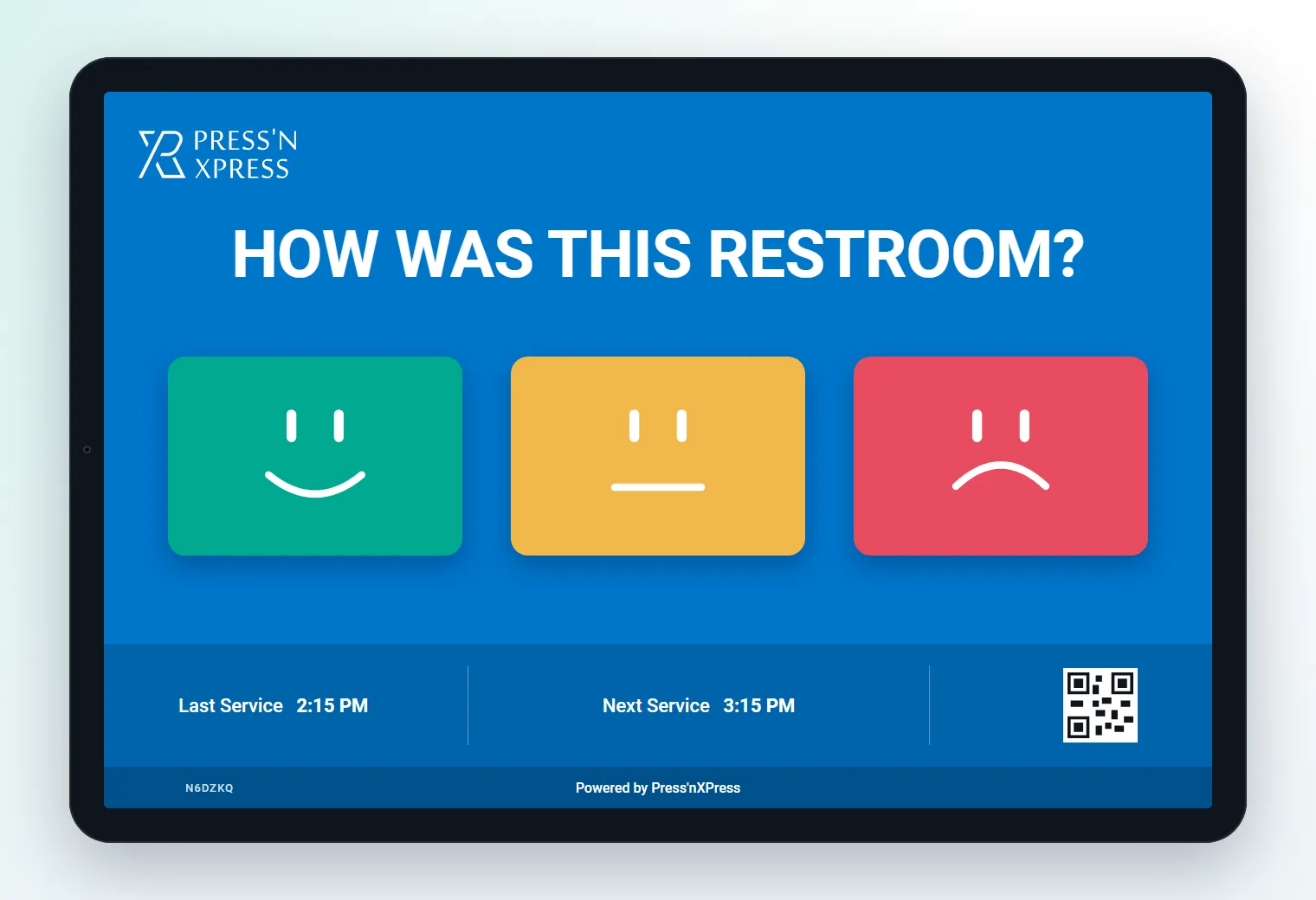
Along the bottom of the feedback screen, the display shows when the restroom was last serviced and when the next round is due. It updates the moment a cleaner checks in, so the time visitors see is always backed by a verified service - not a hand-written initial.
Cleaning Verification
Every service is confirmed at the restroom itself, by the person who did it.
The cleaner scans the code shown on the restroom's feedback display - so the check-in can only happen on site.
A personal code ties the service to the cleaner who did it - no shared logins, no initials on paper.
A quick photo of the finished restroom or a maintenance issue is attached to the record.
The service is time-stamped, any open work order can be closed, and the display updates Last Service for visitors.
Because the check-in starts from the display on the restroom wall, it can't be completed from the break room or filled in at the end of a shift. Each record carries the restroom, the cleaner, the time and an optional photo - the kind of janitorial proof of service that holds up in a client review or an audit.
Why paper cleaning logs fail, and what a trustworthy digital record looks like: Restroom cleaning logs and proof of service
Work Orders & Alerts
Thresholds, work orders, notifications and SLA escalation run automatically - here is one lunch hour at a busy food-court restroom.
Visitors at the Level 2 food-court restroom tap the red smiley and choose “supplies”. The restroom's threshold is three in a row.
PXP opens a work order for that restroom with the reason and the visitor count since the last service attached.
The cleaner assigned to Level 2 gets the alert on their phone by WhatsApp, with SMS as a fallback. Delivery is confirmed.
The work order is still open, so the alert escalates to the shift supervisor by SMS and email.
The cleaner checks in at the restroom with a photo. The work order closes with a 19-minute resolution time, and Last Service updates on the display.
Thresholds are set per restroom, so a high-traffic food-court restroom can raise a work order sooner than a quiet office floor. Notifications go to the cleaner assigned to that restroom by WhatsApp, SMS or email, with delivery tracked for every message. If the SLA passes without a fix, the alert escalates to a supervisor automatically.
Work orders, notifications and escalation are managed in PXP Action Hub. Explore Action Hub
Usage-Based Cleaning
Traffic data shows which restrooms need more service and which are being over-cleaned - and turns raw complaints into a fair comparison.
| Restroom | Visitors | Cleanings | Rating | SLA met | Per 1,000 visits | Status |
|---|---|---|---|---|---|---|
| L3 · Offices | 1,920 | 9 | 4.8 | 100% | 0.5 | Strong |
| L1 · Lobby (M) | 3,410 | 14 | 4.6 | 97% | 1.2 | On track |
| L1 · Lobby (W) | 3,980 | 14 | 4.2 | 92% | 2.4 | Watch |
| L2 · Food court (W) | 6,240 | 16 | 3.4 | 81% | 5.1 | Act |
In this example the food-court restroom has more than three times the traffic of the office floor but less than twice the cleanings - and it shows in its rating, its SLA result and its complaint rate. Complaints per 1,000 visits makes that visible: a busy restroom with a handful of complaints may be performing better than a quiet one with fewer. Restroom names and figures are illustrative.
With a people counter in place, each restroom can also carry a traffic threshold - for example, service after a set number of visitors since the last check-in - alongside its regular schedule. Busy restrooms get attention at the moment they need it, and quiet ones stop absorbing cleaning time they don't need.
How usage-based cleaning works in practice, and how to set thresholds: Usage-based cleaning with people counters
Why PXP
Paper logs record intentions. Hotlines record failures. A smart restroom system records what actually happened.
| Dimension | Paper log & fixed schedule | Complaint hotline | PXP smart restroom |
|---|---|---|---|
| When it's cleaned | By the clock | After someone complains | By schedule, traffic and live feedback |
| Proof of service | Initials on a clipboard | None | Verified on-site check-in, time-stamped |
| Issue response | Next round | Manual dispatch | Automatic work order and notification |
| Escalation | None | Phone tree | Supervisor alert when the SLA is missed |
| Reporting | Binders | Call counts | SLA, response time and complaints per 1,000 visitors |
Why a text-in hotline alone can't manage restroom quality: Restroom feedback vs. the complaint hotline
Built for Every Building
The same loop, set up around the traffic pattern of each type of building.
Lunch peaks, meeting breaks and multiple floors.
Traffic that follows flight banks, not office hours.
Visitor washrooms where cleanliness shapes trust.
Weekend and event surges that break fixed schedules.
Run every client site from one system - and turn daily work into contract-renewal evidence.
Janitorial and FM contractors use the same records to win and keep contracts. Real-time feedback as SLA evidence
FAQ
What facility managers and janitorial contractors ask before a pilot.
Smart restroom management connects visitor traffic, visitor feedback, cleaning activity and work orders for every restroom in one system. Teams clean when usage and feedback say a restroom needs it, confirm every service on site, and report response times and SLA results to leadership or clients.
A people counter at the restroom entrance counts visitors. Instead of cleaning only on a fixed timetable, teams set a traffic threshold per restroom - for example, service after a set number of visitors - alongside the regular schedule, so busy restrooms are cleaned more often and quiet ones are not over-serviced.
The cleaner confirms each service at the restroom itself, by scanning the code on the restroom's feedback display and confirming with their personal code, with an optional photo. The check-in is time-stamped, attributed to the cleaner, and updates the Last Service time shown to visitors.
Each restroom has its own alert thresholds. When visitors leave a set number of negative ratings in a row - or a restroom misses its scheduled service - PXP opens a work order for that restroom with the reason attached, and tracks it until it is resolved.
The cleaner assigned to the restroom is notified by SMS, email or WhatsApp as soon as a work order opens. If it is not resolved within the SLA, the alert escalates to a supervisor. Delivery status is tracked for every message.
Yes. Every work order records when it opened and when it was resolved, and every cleaning check-in is logged by restroom, cleaner and time. Dashboards and leadership reports show cleanings, response times, SLA met and visitor satisfaction by restroom and site.
Yes. Each restroom keeps its own service schedule, and the feedback display shows visitors the Last Service and Next Service times. Traffic thresholds and feedback alerts add service where it is needed on top of the schedule.
Yes. Restroom is the common term in the United States and washroom in Canada; public toilet is used in many other countries. PXP works the same way for all of them: visitor counts, in-the-moment feedback, automatic work orders and verified cleaning check-ins for every restroom, washroom or toilet block.
Yes. Visitor feedback is anonymous by default, and the people counter counts people, not identities - it stores anonymous in and out counts only. Personal details are held only for staff, such as cleaner and supervisor contact information.
Business Impact & ROI
The return comes from putting cleaning time where it matters and proving that the work was done.
Busy restrooms get serviced before they fail, and issues are fixed while visitors are still in the building.
Usage-based service moves cleaning time from quiet restrooms to busy ones - often without adding hours.
Verified on-site check-ins replace paper logs, so service history holds up with clients and auditors.
Automatic work orders and WhatsApp, SMS or email alerts cut the time from complaint to fix.
Every restroom has an assigned cleaner, a supervisor and an SLA, and every alert has an owner.
Contractors show SLA results, response times and visitor satisfaction site by site at every review.
Start With One Floor
Pilot smart restroom management on one floor or one client site - feedback display, verified check-ins and work orders first, people counting where traffic is highest - and see the difference in the first weeks.
Further Reading
Practical guides for facility managers and janitorial contractors.
Related PXP Pages
The products and use cases behind smart restroom management.