One tap
A single question on a smiley terminal, answered in a second at the exit or washroom.
RateDone
Survey Builder
Build multi-question surveys with follow-up reasons, voice answers, contact fields and answer-based logic - then put the same survey on tablets, QR codes, links, email, SMS and phone calls. PXP AI Agent can draft it for you.
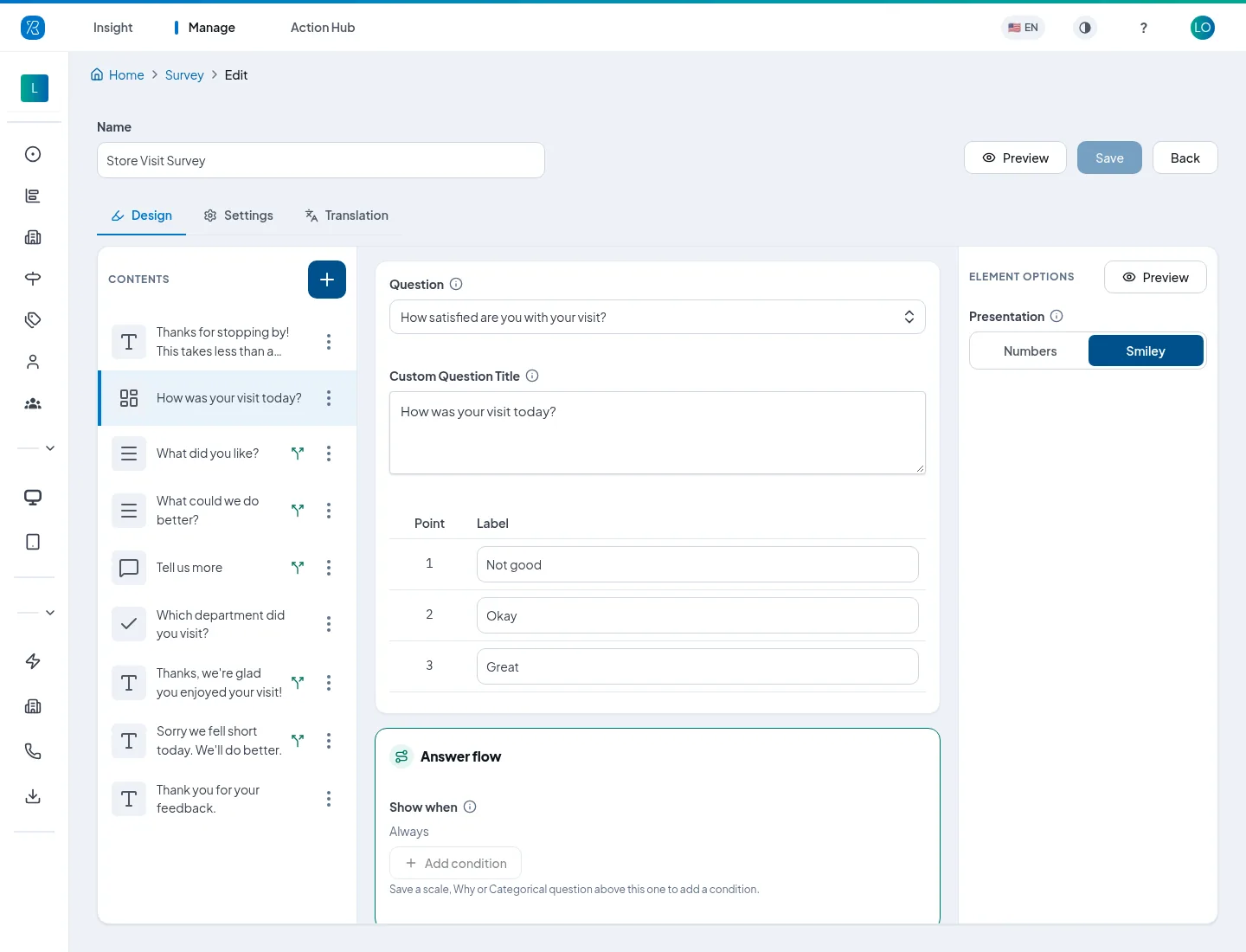
How was your visit today?
One tap or a full survey
A smiley terminal at a washroom door should take one tap. A tablet at reception, a QR code at the table or an email after a purchase can ask more. The survey builder covers both, on the same platform and the same dashboard.
A single question on a smiley terminal, answered in a second at the exit or washroom.
A rating, the reasons behind it, a comment and contact details - each person only sees what applies to them.
Attach one survey to tablets, QR codes, links, email, SMS, website widgets or phone calls.
Question types
A rating on 3, 5, 7, 10 or 11 points, shown as numbers or as smiley faces.
Pick one or several from a list, such as “Which department did you visit?”
The reasons behind a rating, such as Staff or Wait time, shown as a list or chips with icons.
A free text box, optional or required.
People speak their answer or type it - a voice answer arrives as text.
Name, email, mobile, company or a custom field, for follow-up and service recovery.
Text with no answer: an intro, instructions, a section heading or a thank-you.
Let people pick more than one answer on a Categorical or Why question, with a minimum and maximum.
In the visual style, reasons appear as icon tiles or rows that read at a glance in any language.
Logic without complexity
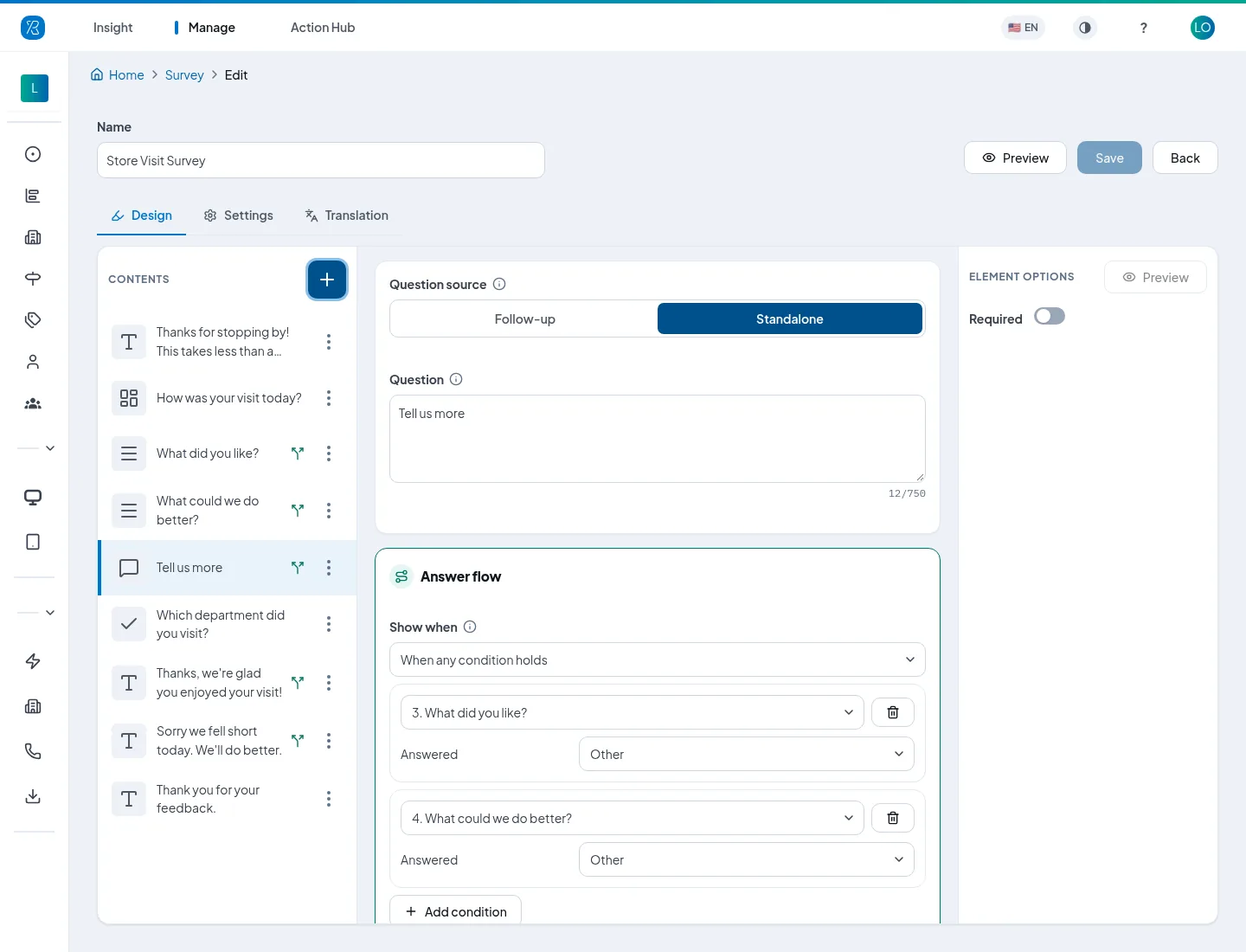
Any question can have a Show when rule based on earlier answers. Ask “What could we do better?” only of unhappy customers, “What did you like?” only of happy ones, and “Tell us more” only when someone picks Other. Combine conditions with all or any.
Finish with a different thank-you for each mood - so an unhappy customer reads an apology, not a cheerful “Thanks!”.
How was your visit today?
What did you like?
Tell us more
“The new bakery counter is lovely.”
Thanks, we're glad you enjoyed your visit!
How was your visit today?
What could we do better?
Tell us more
Skipped - didn't pick OtherSorry we fell short today. We'll do better.
Powered by PXP AI Agent
Tell PXP AI Agent what you need - “a short washroom survey that asks unhappy visitors why” - and it drafts the questions, follow-up whys, Show when rules and thank-you messages for you to review in the builder.
Ask PXP AI Agent to reword a question, add a follow-up, translate the survey or switch it on a touchpoint, and the change reaches every terminal, tablet and QR code without a site visit. Once answers arrive, PXP AI groups comments and voice transcripts by theme and sentiment, summarizes the survey report, and answers follow-up questions in plain language.
See PXP AI in the dashboard“A short washroom survey. Ask unhappy visitors what needs attention, and thank happy ones.”
Visual surveys
Every survey can use the classic style or the visual style. The visual style puts your brand on a picture of the place, shows reasons as picture tiles, and lets people answer by voice, text or guided choices. Questions, logic and data stay exactly the same.
How clean is this washroom?
What needs attention?
Tell us about the pantry
“Great coffee, but the fridge was empty again after lunch.”
Templates
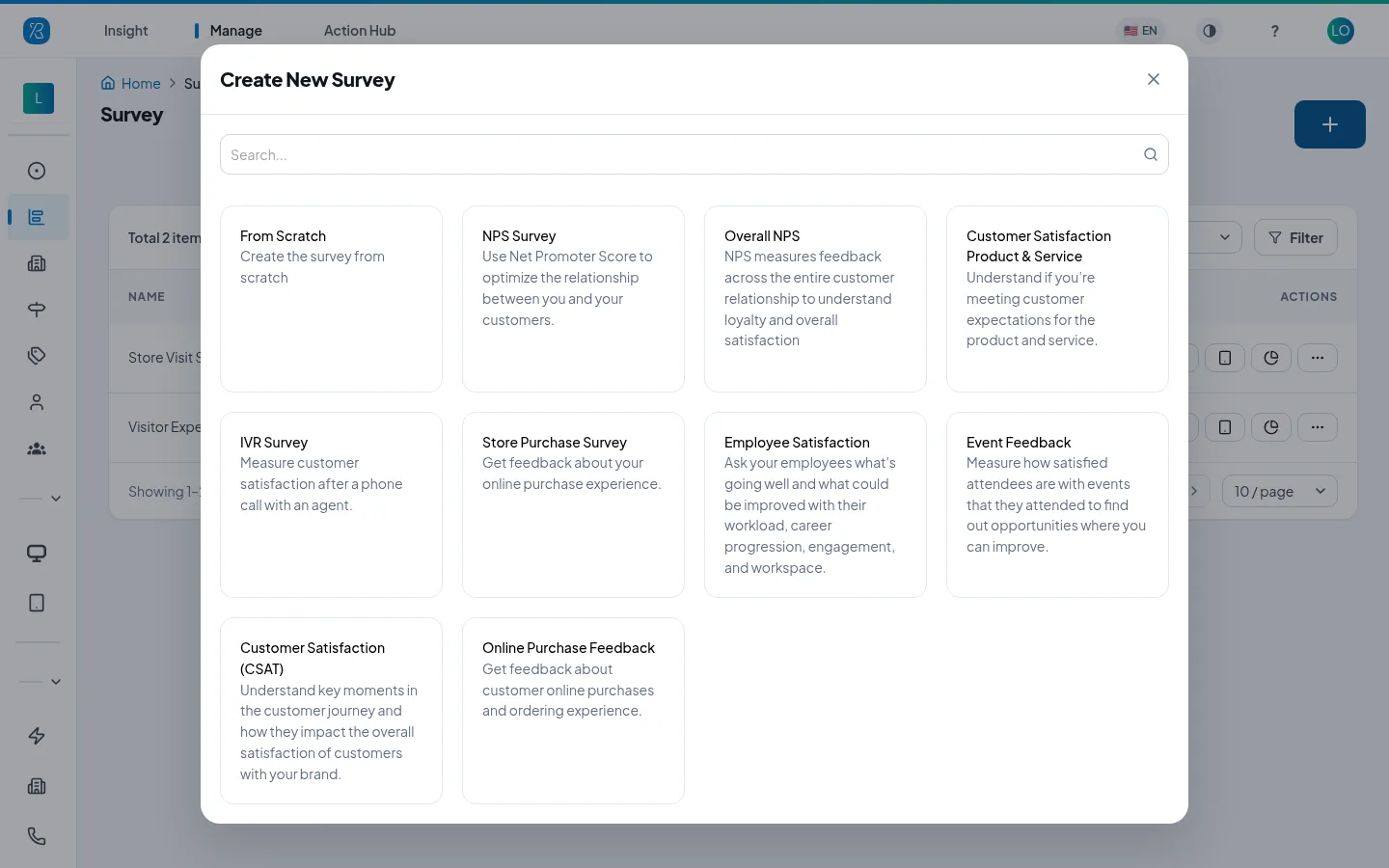
Nine templates come with their questions, intro and thank-you ready to go. Reword any question and delete the ones you don't need.
Look & feel
One question at a time, or the whole survey on one scrolling page.
Turn off navigation arrows and the survey moves on with each tap - ideal on kiosks.
Ready-made themes from White to Midnight Blue, nine fonts, and your own colours with a contrast readout.
Classic, Soft or DashEye faces on rectangle, circle or squircle tiles, filled or outline.
Show your logo on the first page or every page, with a progress bar along the top.
The same survey in other languages, from the Translation tab.
Every channel
A survey goes live when a touchpoint uses it. For a QR code, widget or link you can switch to a different survey later, and the codes and links already handed out open the new one.
Full surveys at reception, wards, cafés and washrooms.
Learn moreSwap the survey behind a printed code without reprinting.
Learn moreA survey link after a purchase, visit or appointment.
Learn moreSurvey invites by text after a delivery or service.
Learn moreThe survey in a widget on your site or app.
Learn moreStart from the IVR Survey template for post-call feedback.
Learn moreResponses & reports
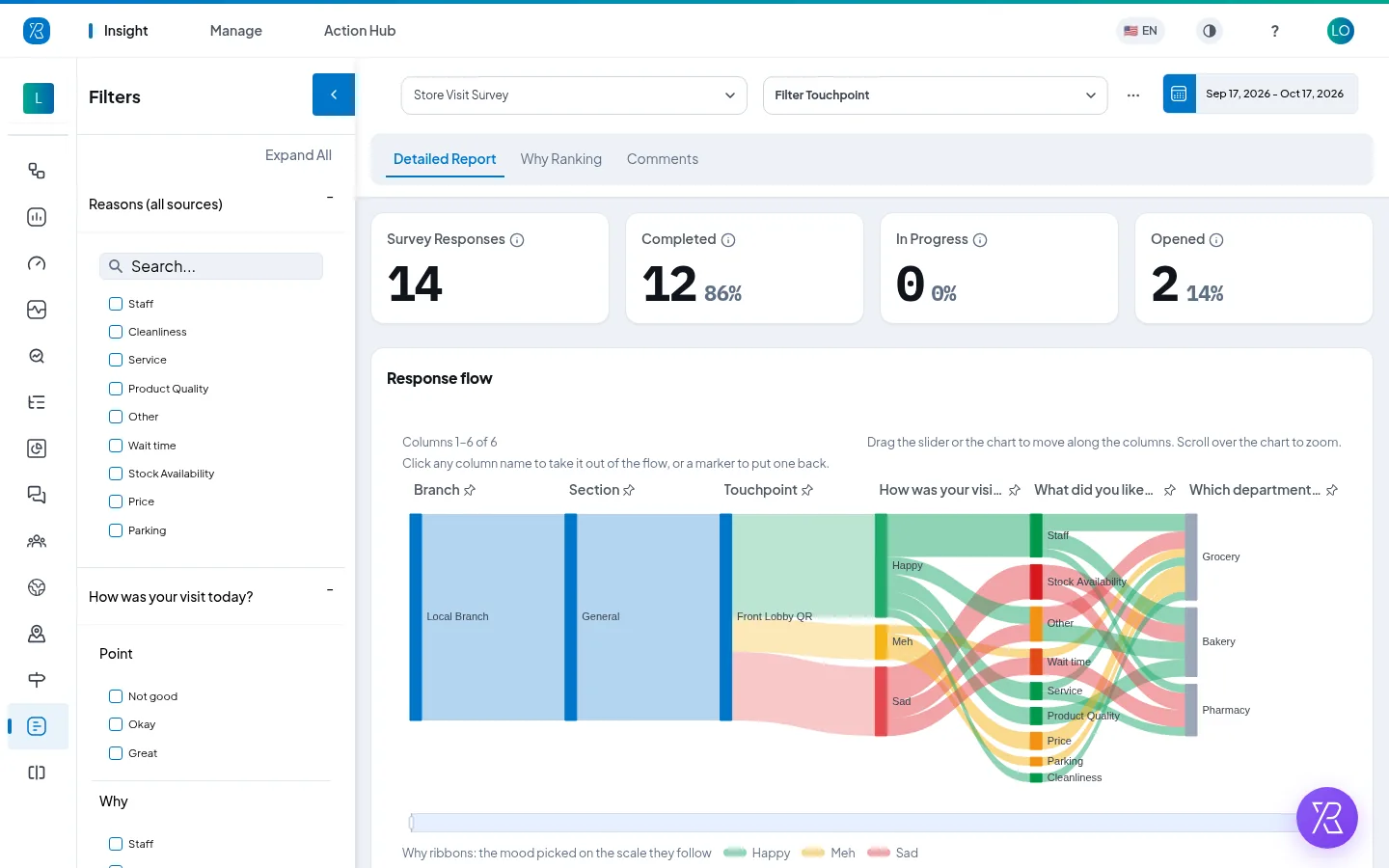
The survey report shows how many people opened, started and completed the survey, and follows every answer from the rating to the reasons behind it. Rank the whys, read each person's answers and comments, and let PXP AI group them by theme.
To send each answer to your own systems as it arrives, use a webhook.
FAQ
Yes. The survey builder creates multi-question surveys with scale, categorical and why questions, open comments, voice and text answers, contact fields and statements. Attach a survey to a tablet, QR code, link, email, SMS, website widget or phone touchpoint, while smiley terminals keep their one-tap question.
Yes, with Show when rules. Any question, comment or thank-you can be shown only when earlier answers match, such as a rating of Dissatisfied or a reason of Other. Conditions can be combined with all or any. Each respondent only sees the questions that apply to them.
Yes. Describe what you want to learn and PXP AI Agent drafts the questions, follow-up whys, Show when rules and thank-you messages for you to review. You can also ask it to reword a question, add a follow-up or translate the survey, and changes reach every touchpoint without a site visit.
Yes. A Voice & Text question lets people speak their answer or type it. Spoken answers are transcribed, so your team reads a comment instead of listening to a recording, and PXP AI groups them by theme and sentiment with the rest of the feedback.
Nine: NPS Survey, Overall NPS, Customer Satisfaction (CSAT), Customer Satisfaction Product & Service, Store Purchase Survey, Online Purchase Feedback, Employee Satisfaction, Event Feedback and IVR Survey. You can reword any question in a template or start from scratch.
Yes. The Translation tab holds the same survey in other languages, so one survey serves sites with mixed-language visitors.
Tell us what you need to learn and where people will answer. We'll show you the builder, the templates and PXP AI Agent with a survey set up for your locations.