From Feedback to Work Order in Minutes: Operational Alerting for Facility Services

Facility services companies have never had a shortage of information about what's wrong. Visitors complain, building managers send emails, supervisors walk the floor. The problem has always been the gap between knowing and fixing — the minutes or hours between a visitor noticing an empty soap dispenser and an associate actually refilling it.
Real-time feedback closes half of that gap: it tells you, the moment it happens, that a specific restroom needs attention. Operational alerting and work orders close the other half: they make sure someone acts, and they record that it happened.
This post walks through how PXP connects the two — from a low rating at the washroom door to a closed work order — and the metrics facility services teams use to manage and prove performance.
Why Feedback Without Follow-Up Is Just a Dashboard
Plenty of facility teams have tried feedback buttons or QR codes and quietly abandoned them. The usual reason isn't that the feedback was wrong. It's that nothing happened afterward.
A dashboard full of red restroom scores that nobody is assigned to act on creates more frustration, not less. Supervisors check it occasionally, associates never see it, and clients start asking why the same washroom keeps getting complaints. Feedback only becomes valuable when every negative signal has an owner, a deadline, and a recorded outcome.
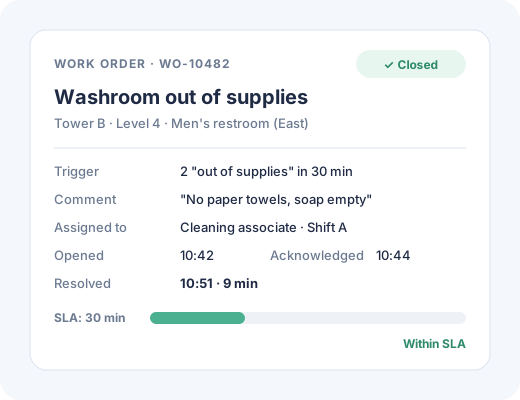
That's what a work order does. It turns "someone said the restroom is dirty" into "this associate was assigned this restroom at 10:42 and closed it at 10:51."
How Operational Alerting Works in PXP
In PXP, work orders are part of Action Hub workflows. The flow looks like this:
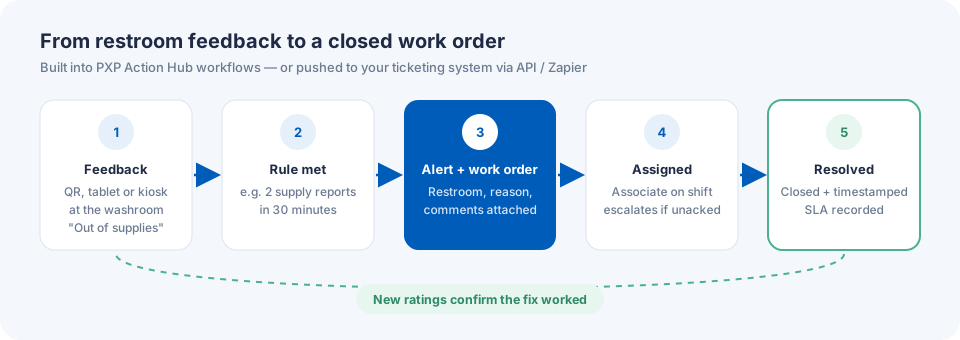
1. Feedback arrives, tied to a place. A visitor rates a restroom using a QR code at the door, a wall-mounted tablet running the PXP Feedback App, or a Smiley Feedback Terminal. They choose a reason — out of supplies, needs cleaning, maintenance — and can add a comment. The response is tied to the exact washroom, floor, and building.
2. A workflow rule evaluates it. You define what counts as actionable. A single "very poor" rating might be enough for a hospital washroom. In a busy airport restroom, you might wait for two "out of supplies" responses within 30 minutes to avoid chasing one-off reports. Rules can differ by site, area, time of day, and issue type.
3. An alert fires and a work order is created. When a rule is met, PXP raises an alert and creates a work order with everything the associate needs: restroom, location, reason, comments, and time of the first report.
4. The work order is assigned. It's routed to the associate or supervisor responsible for that area and shift — not to a generic inbox. If it isn't acknowledged within a set time, escalation rules notify the next level up.
5. The issue is resolved and closed. The associate restocks, cleans, or calls maintenance, then closes the work order. PXP records time to acknowledge, time to resolve, and whether it was within SLA.
6. The loop is verified. New feedback from the same restroom confirms whether the fix worked. If ratings stay low, a repeat work order flags a deeper problem.
Built In, or Connected to Your Ticketing System
Facility services companies arrive with very different setups. Some have no ticketing system at all; supervisors coordinate by phone and radio. Others run a mature helpdesk or maintenance management platform that the whole organization depends on.
PXP supports both:
- Built-in work orders. Work orders are part of PXP's Action Hub workflows, so teams can create, assign, track, and close them entirely in PXP, with no extra system to buy or maintain.
- Integration with existing ticketing. Organizations that already use a ticketing or maintenance system can connect PXP through its API or Zapier integrations, so feedback-triggered tickets land where their teams already work.
Either way, the feedback, the work order, and the outcome stay linked — which is what makes the reporting possible.
Setting Smart Alert Thresholds
The fastest way to burn out an alerting program is to alert on everything. A few practical guidelines:
Match the threshold to the risk. Healthcare washrooms and food-prep areas justify single-response alerts. General office restrooms can use a count or a score threshold.
Separate issue types. "Out of supplies" goes to the cleaning associate on the floor. "Maintenance" — a leaking tap or broken lock — goes to the technician queue. One alert stream for everything slows both down.
Use time windows. Two negative responses in 30 minutes is a pattern. Two in a week may not be.
Respect shifts. Route to whoever is actually on duty in that zone right now.
Escalate quietly. If a work order isn't acknowledged in 10 minutes, notify the supervisor. If it isn't resolved in 30, notify the account manager.
The Metrics That Prove It Works
Once feedback and work orders are linked, facility services companies can report on operations with a precision that used to require manual audits:
Work orders by facility and by restroom. Where issues are happening, and which restrooms and washrooms generate repeat work orders.
Feedback score by restroom. How each washroom is rated over time, and whether scores recover after a work order is closed.
Time to acknowledge and time to resolve. The core speed metrics, by site, shift, and issue type.
SLA compliance by work order. The percentage of work orders closed within the agreed response time, by facility and by client contract.
Cleaning and attendance by associate, location, and facility. Where associates log rounds or check-ins on the tablet, you can see whether scheduled cleaning happened and who responded to which work orders.
Issue mix. The share of supplies, cleaning, and maintenance issues per restroom — a signal for adjusting stock levels, round frequency, or capital repairs.
These are the numbers that support better scheduling internally and better conversations with clients. We cover the client side in more detail in Win and Keep Facility Contracts With Proof.
What Changes on the Ground
For associates, the change is simple: instead of waiting for the next scheduled round, they get a clear task for a specific restroom. For supervisors, it's visibility — which work orders are open, who has them, and which are at risk of breaching SLA. For account managers, it's proof: a record showing that issues were found and fixed fast.
And for visitors, it's the only thing they care about. The washroom was out of soap at 10:40. By 10:51, it wasn't.
Getting Started
Most facility services teams begin with one client site:
- Deploy restroom collectors at the busiest washrooms — QR codes at every door, tablets where traffic is highest.
- Define two or three alert rules by issue type.
- Map work orders to the associates and supervisors on each shift.
- Run for four weeks and review time to resolve, SLA compliance, and restroom scores.
From there, it's straightforward to expand across a client's portfolio — and to bring the results into the next client review. For background on restroom feedback itself, see Your Restrooms Are Talking.
The Bottom Line
Real-time feedback tells you where the problem is. Operational alerting and work orders make sure it gets fixed — and give you the data to prove it. For facility services companies, that combination turns restroom feedback from a nice-to-have into a core part of how service is delivered and measured.
Want to see feedback-to-work-order in action for your sites? Book a demo and we'll map a workflow to one of your client locations.
Frequently Asked Questions
How does PXP turn feedback into a work order?
Workflows in PXP Action Hub watch incoming feedback against rules you define -- for example, two 'out of supplies' responses at the same washroom within 30 minutes. When a rule is met, PXP raises an alert and creates a work order with the location, reason, and comments attached, assigns it to the right associate or supervisor, and tracks it until it's closed.
Can PXP work orders connect to our existing ticketing or CMMS system?
Yes. Work orders are built into PXP as part of Action Hub workflows, so teams can run them end to end in PXP. Organizations that already use a ticketing, helpdesk, or maintenance management system can integrate PXP through its API or Zapier so tickets are created where their teams already work.
What metrics should facility services companies track for work orders?
The most useful are work orders by facility and by restroom, time to acknowledge, time to resolve, percentage closed within SLA, repeat work orders on the same restroom, and feedback scores before and after resolution -- broken down by associate, location, and facility.
How fast can a restroom issue be resolved with operational alerting?
With alerts routed directly to the associate covering the area, many restroom and washroom issues such as supplies or spot cleaning can be resolved within minutes rather than at the next scheduled round. PXP records the time from the first negative signal to work order closure so you can measure it.
 Press'nXPress Team