Feedback in the moment. Fixed the same day.

The AI customer feedback management platform that sends every response, on‑site or online, to the team who can fix it.

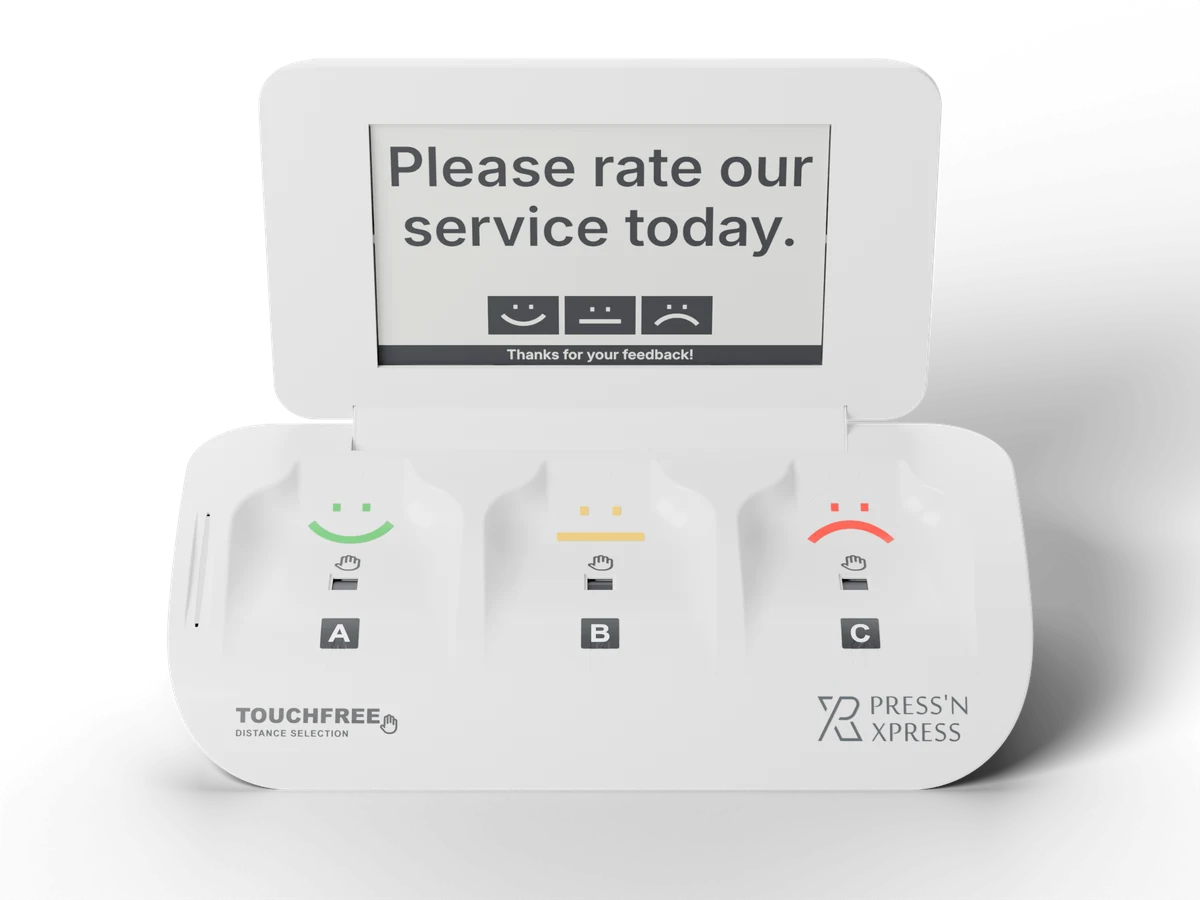
Press'nXPress TouchFree feedback terminal showing 'Please rate our service today.' above three touchless smiley pads, rendered from the product's CAD model

Touchless: hold your cursor over a face.tap a face to answer.

Restroom 3 · Level 2

Today · 57 answers

XPressScore9.0

  • Happy4681%
  • Meh814%
  • Sad35%

Alerts go to Facilities after 3 unhappy answers in an hour.

Years helping operators listen
10+
Corporate clients across six industries
75+
Feedback signals captured in the moment
12M+

Trusted by teams at

  • BMW
  • Cushman & Wakefield
  • Compass Group
  • Canteen
  • LIV
  • Government of Nunavut
How PXP helps

Improve Service Recovery with Real-Time Feedback and PXP AI

PXP connects feedback collection, AI-assisted analysis, and team action so service issues move from signal to recovery faster.

Actionable insights

See What's Driving Scores

Use dashboards and PXP AI to surface themes, sentiment shifts, and the service issues teams should act on first.

Explore dashboard
Closed-loop action

Act Across Teams

Turn feedback into work orders and alerts by SMS, email or WhatsApp, escalate when the SLA is at risk, and confirm every fix.

Explore Action Hub

From feedback to fixed

Low Scores Become Work Orders, Alerts and Verified Fixes

When feedback points to a problem on site, Action Hub opens a work order for that location, alerts the right person and keeps the clock running until the fix is confirmed.

  1. Threshold reachedPer-location rules spot a run of low ratings or a missed check.
  2. Work order openedAssigned to the person who owns that location, reason attached.
  3. Alert sentBy SMS, email or WhatsApp, with delivery tracked.
  4. Escalated on SLAA supervisor is alerted if it is still open when the target passes.
  5. Fix verifiedConfirmed on site, with the resolution time on record.

Meet PXP AI

PXP AI works in the background across your feedback data so teams can ask questions, summarize themes, understand sentiment, and move from insight to action without digging through every dashboard.

Ask Your Feedback Data

Ask questions like "Which account has the lowest score?", "How many responses were recorded?", or "What is the overall score for the company?"

Understand What Changed

PXP AI summarizes feedback, detects sentiment and recurring themes, and points teams to the locations, branches, and touchpoints that need attention.

Get Recommended Actions

Turn complex feedback into clear next steps so managers can respond faster, recover unhappy customers, and improve service quality.

See the PXP Platform in Action

See how feedback collectors, dashboard analysis, alerts, and PXP AI work together to help teams improve customer and employee experience.

Where Feedback Pays Back

Reduce avoidable complaints, compare performance location by location, recover at-risk customers faster, and identify the experiences that keep satisfied customers coming back. Touchless kiosk sites see 30%+ response rates, so the signal is there to act on.

Complaint reduction
Feweravoidable complaints

Spot recurring service issues earlier, route them to the right team, and act before they spread across locations.

Location monitoring
Compareperformance by location

See which branches, departments, or touchpoints are improving, slipping, or creating repeat service issues.

Service recovery
Fasterfollow-up with at-risk customers

Turn low scores and negative comments into alerts, tasks, and closed-loop recovery workflows.

Satisfied customer value
Higherrepeat spend potential

Use satisfaction signals to understand which experiences drive loyalty, return visits, and higher customer value.

Built to scale

Designed for teams managing many locations and touchpoints.

Whether you manage branches, stores, facilities, properties, campuses, or service teams, PXP gives every role the visibility they need to understand feedback and act quickly.

Role-based dashboards for leaders, managers, and frontline teams

Location, branch, department, and touchpoint comparisons

Real-time alerts when feedback needs attention

Action Hub follow-up to close the loop with customers

CRM, POS, help desk, BI, and workflow integrations

Customer success support from pilot to rollout

Deerhurst Resort · Frontline staff feedback

Went from one employee survey a year to continuous, anonymous, department-level feedback from frontline staff.

Watch the interview with Brody Purser, Director of Human Resources

Frequently Asked Questions

What is Press'nXPress (PXP)?

PXP is an AI customer feedback management platform. It collects real-time feedback from kiosks, tablets, QR codes, SMS, WhatsApp, email, web and voice, uses PXP AI to explain what changed, and turns issues into alerts and work orders so teams can fix them while it still matters.

Which channels can PXP collect feedback from?

PXP collects feedback through touchless smiley kiosks, the Feedback App on tablets, QR codes, SMS and WhatsApp invitations, email, website and in-app surveys, and post-call voice feedback. People counters add foot traffic, so every score can be read against real visitor numbers.

What does PXP AI do?

PXP AI summarizes feedback, detects sentiment and recurring themes, answers questions about your data in plain language, and points teams to the locations and touchpoints that need attention first.

Can PXP trigger work orders and staff alerts?

Yes. With Action Hub, per-location thresholds open work orders automatically, notify the responsible person by SMS, email or WhatsApp, escalate to a supervisor if the SLA is missed, and record when and how each issue was resolved.

Which languages do PXP surveys support?

Feedback collectors can be set up in any language, so each site can ask customers in the languages they speak. The PXP Analytics dashboard is available in 5 languages.

Does PXP integrate with our existing systems?

Yes. PXP connects feedback and action data with CRM, POS, help desk, BI and workflow tools through its integrations and API, so feedback can trigger processes in the systems your teams already use.

How do we get started with PXP?

Most teams start with a pilot in one area of the business - a site, a set of touchpoints or a single use case. Our customer success team helps you measure results, then roll out to more locations and channels.
Start With a Pilot. Scale When It Proves Itself.

We deploy PXP at a focused set of locations, show you what the feedback reveals, then roll out to more locations and touchpoints with you. Our Customer Success team supports you from pilot to rollout.

  • Pilot at a few locations first
  • Help choosing terminals for each site
  • No hidden fees
  • Surveys in any language

Subscribe to our newsletter to stay in touch with the latest.

Markham, ON, CanadaLos Angeles, CA , United States
Blog|Pricing|Use Cases|FAQ|Privacy Policy|Terms of Use|Contact Us|