Text Analytics 101: Turning Open-Ended Comments Into Action Without Reading Every Response

Every feedback program has the same quiet backlog: the comment box. Scores are easy — they roll up into a dashboard and a trend line without anyone lifting a finger. Comments are different. They hold the actual reason behind a score, the detail a manager needs to fix something, and the language customers use when they're frustrated. But at any real volume, nobody has time to read them all, so most of them never get read at all.
Text analytics exists to close that gap. Done well, it lets a team get the value of the open-ended box without assigning someone to read thousands of responses a week. This post covers what text analytics actually does, how it turns comments into action, and what separates a useful tool from a word cloud.
Why the Comment Box Was the Most Ignored Part of the Survey
For years, open-ended feedback lived in an awkward place. Everyone agreed it was valuable — it's where customers explain why they gave a two out of five — but processing it was manual. Someone exported the comments to a spreadsheet, skimmed a sample, and pulled a few quotes for a monthly deck. Anything beyond that sample was effectively lost.
That created two problems. First, the insight arrived late: by the time someone read a comment about a broken hand dryer or a rude interaction, the moment to fix it had long passed. Second, it was biased toward whatever the reader happened to notice. A recurring complaint spread thinly across many locations — the same issue mentioned five times a day across twenty sites — could go unseen because no single location had enough of it to stand out in a skim.
Score-only reporting doesn't solve this either. A score tells you that something is wrong. It almost never tells you what.
What Text Analytics Actually Does
At its core, text analytics does three jobs on every comment that comes in.
Sentiment analysis reads the tone of a comment — positive, neutral, or negative — and how strongly. "Great, quick service" and "waited forever and nobody helped" both get a score that can be trended and compared, independently of the numeric rating the customer chose.
Theme and topic clustering groups comments by what they're about. Comments mentioning "dirty," "smell," "no soap," and "paper towels" cluster into a restroom or cleanliness theme; comments about "line," "wait," and "slow" cluster into speed of service. This is the step that turns a pile of free text into categories a manager can recognize.
Keyword and phrase discovery watches for specific terms that are new or rising. A sudden jump in mentions of "broken," "leak," or a specific product name at one location is often the earliest signal that something just went wrong.
PXP's Sentiment & Text Analytics does all three automatically and connects the results to the locations, touchpoints, and time windows the feedback came from — which is where it starts to become operational rather than academic.
From Comments to Themes: A Worked Example
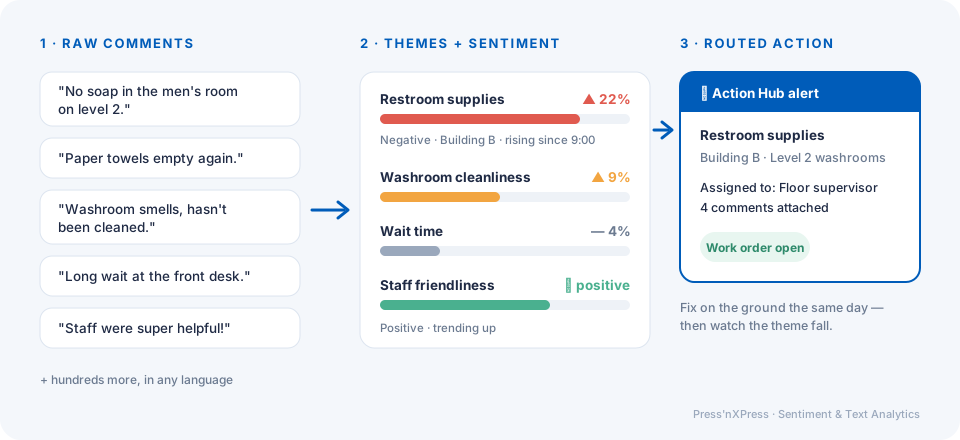
Picture a multi-site operator — an office portfolio, a retail chain, an airport — collecting quick feedback at dozens of touchpoints. Over a Tuesday morning, these comments arrive from different restrooms across one building:
- "No soap in the men's room on level 2."
- "Paper towels empty again."
- "Washroom smells, hasn't been cleaned."
- "Out of hand soap near the food court."
Read individually, each is a minor gripe. Read together by a text analytics engine, they form a clear pattern: a restroom supplies theme, negative sentiment, concentrated in one building, rising since 9 a.m. That's no longer four comments — it's one operational issue with a location, a trend, and a probable cause (a missed restocking round).
This is the shift text analytics creates. Instead of asking a manager to notice a pattern, the system surfaces it.
Making It Comparable Across Locations
The real payoff appears when you run the same analysis across every site. A theme that represents 4% of comments at most locations but 22% at one location is a clear outlier worth investigating. Sentiment on "staff friendliness" trending down at one site for three consecutive weeks is an early warning about a team problem before it shows up in turnover or reviews.
Because every comment is tied to a specific location and touchpoint, text analytics can answer questions a score alone can't:
- Which locations have the most negative comments about cleanliness this month?
- Which touchpoint — entrance, checkout, restroom, waiting area — generates the most complaints about wait time?
- Is the restroom and washroom theme improving since we changed the cleaning schedule?
- Which keywords are new this week that weren't there last week?
That's the difference between "read the comments" and "measure the comments."
From Insight to Action
The most common failure in text analytics isn't the analysis — it's what happens after. A beautifully clustered theme report that nobody acts on is just a more sophisticated version of the unread spreadsheet.
The useful pattern is to connect themes to a response. In PXP, when a negative theme spikes at a location or a comment contains a high-priority keyword, Action Hub can route an alert or a task to the person responsible for that location — a facility supervisor for a washroom supplies theme, a store manager for a service theme — with the comments attached. The pattern in the text becomes a fix on the ground, often the same day, and the resolution is tracked so you can see whether the theme actually improves afterward.
That last step matters. Closing the loop means you can measure whether action worked: did negative mentions of the restroom drop after the restocking schedule changed? Did "slow" comments fall after an extra staff member was added to the lunch shift?
What to Look for in a Text Analytics Tool
Not all text analytics is equally useful for operations. When evaluating a tool, look past the demo word cloud and check for these:
Location and touchpoint context. Every theme should be filterable by site, area, and time. A theme without a "where" can't be acted on.
Trend detection, not just totals. You want to know what's rising, not just what's most common. The most common theme is usually something you already know about.
Multilingual support. In airports, hospitals, and diverse urban locations, comments arrive in many languages. They should all land in the same themes.
Routing, not just reporting. Ask how a theme becomes a task. If the answer is "someone exports it," you'll be back to the backlog problem.
Short comments handled well. Point-of-experience feedback produces short comments — "no soap," "dirty," "fast and friendly." The tool must handle brief text as well as long survey paragraphs.
Integration with your scores. Sentiment and themes should sit alongside your ratings, so you can see which themes are driving a score up or down at each location.
Where Text Analytics Fits in a Real-Time Program
Text analytics works best when the comments are fresh and tied to a specific place. That's why it pairs naturally with point-of-experience collection — a QR or tap prompt, a Smiley Feedback Terminal, or the PXP Feedback App on a tablet. When a customer leaves a two-word comment right at the restroom door or the checkout, the analytics engine knows exactly where it came from and can surface the pattern within minutes rather than weeks.
It's also why open-ended feedback has gone from the least-used part of the survey to one of the most valuable. The comment box was never the problem. The reading was.
The Bottom Line
You don't need to read every comment to benefit from every comment. Text analytics turns open-ended feedback into themes, sentiment, and trends you can compare across locations — and, connected to a routing workflow, into actions that get done while the issue is still fixable.
Want to see what your customers' comments are really saying? Book a demo and we'll walk through text analytics on feedback from locations like yours.
Frequently Asked Questions
What is text analytics for customer feedback?
Text analytics is the automated processing of open-ended feedback comments -- detecting sentiment, grouping comments into recurring themes, and surfacing keywords that are rising or falling. Instead of a person reading every response, the software organizes comments so teams can see what customers are talking about and how they feel about it.
How is sentiment analysis different from theme extraction?
Sentiment analysis tells you how a customer feels -- positive, neutral, or negative. Theme extraction tells you what they're talking about -- cleanliness, wait time, staff friendliness, a restroom out of supplies. Combined, they show which topics are driving negative experiences and where to act first.
Do we still need to read individual comments if we use text analytics?
Yes, but selectively. Text analytics tells you which comments matter -- the cluster of negative remarks about one location, or a sudden spike in a keyword -- so managers read the handful that need attention rather than scrolling through every response.
How does text analytics lead to action rather than just a report?
The value comes when themes and sentiment trigger something. In PXP, a negative theme spiking at a location can route an alert or task through Action Hub to the person responsible, so a pattern in comments becomes a fix on the ground the same day.
 Press'nXPress Team